Come scaricare video dalla Meta Ad Library?

La Meta Ad Library è diventata una risorsa essenziale per esperti di marketing, inserzionisti, ricercatori e creatori di contenuti. Offre trasparenza sugli annunci pubblicati su piattaforme Meta come Facebook, Instagram, Messenger e Audience Network, consentendo a chiunque di visualizzare creatività pubblicitarie reali di brand di tutto il mondo.
Uno dei tipi di contenuto più preziosi nella Meta Ad Library sono gli annunci video. Studiando questi video, gli utenti possono analizzare gli elementi creativi, la durata, i sottotitoli, gli inviti all'azione e le strategie pubblicitarie generali. Tuttavia, Meta non offre un'opzione di download integrata per salvare questi video pubblicitari.
Questo articolo spiega come scaricare video da Meta Ad Library utilizzando metodi diversi: da semplici strumenti a una soluzione avanzata per il download in blocco.
1. Che cos'è Meta Ad Library?
Meta Ad Library è un database accessibile al pubblico creato da Meta per migliorare la trasparenza degli annunci. Consente agli utenti di cercare, visualizzare e analizzare gli annunci degli inserzionisti sulle piattaforme Meta.
Caratteristiche principali di Meta Ad Library:
- Visualizza annunci attivi e inattivi
- Filtra per paese, piattaforma, data e categoria dell'annuncio
- Accedi sia agli annunci politici che a quelli non politici
- Guarda annunci video, immagini e carosello
- Per la maggior parte delle ricerche non è richiesto l'accesso
Sebbene la piattaforma sia eccellente per la ricerca e l'ispirazione pubblicitaria, Meta limita intenzionalmente i download diretti per proteggere i contenuti degli inserzionisti, motivo per cui sono necessarie soluzioni di terze parti.
2. È legale scaricare video da Meta Ad Library?
Prima di scaricare qualsiasi cosa, è importante comprendere le regole.
- Usi consentiti : Ricerca, formazione, analisi competitiva, ispirazione, giornalismo
- Non consentito : Ricaricare gli annunci come se fossero tuoi, ridistribuzione commerciale, violazione del copyright
- Le migliori pratiche : Utilizzare i video scaricati esclusivamente per scopi interni o didattici
3. Scarica i video della libreria Meta Ad utilizzando i downloader video online
I downloader di video online rappresentano uno dei modi più semplici per provare a scaricare video pubblicitari Meta, soprattutto per i principianti.
Come funziona:
- Apri Meta Ad Library e individua l'annuncio, copia il link dell'annuncio e aprilo in una nuova scheda.
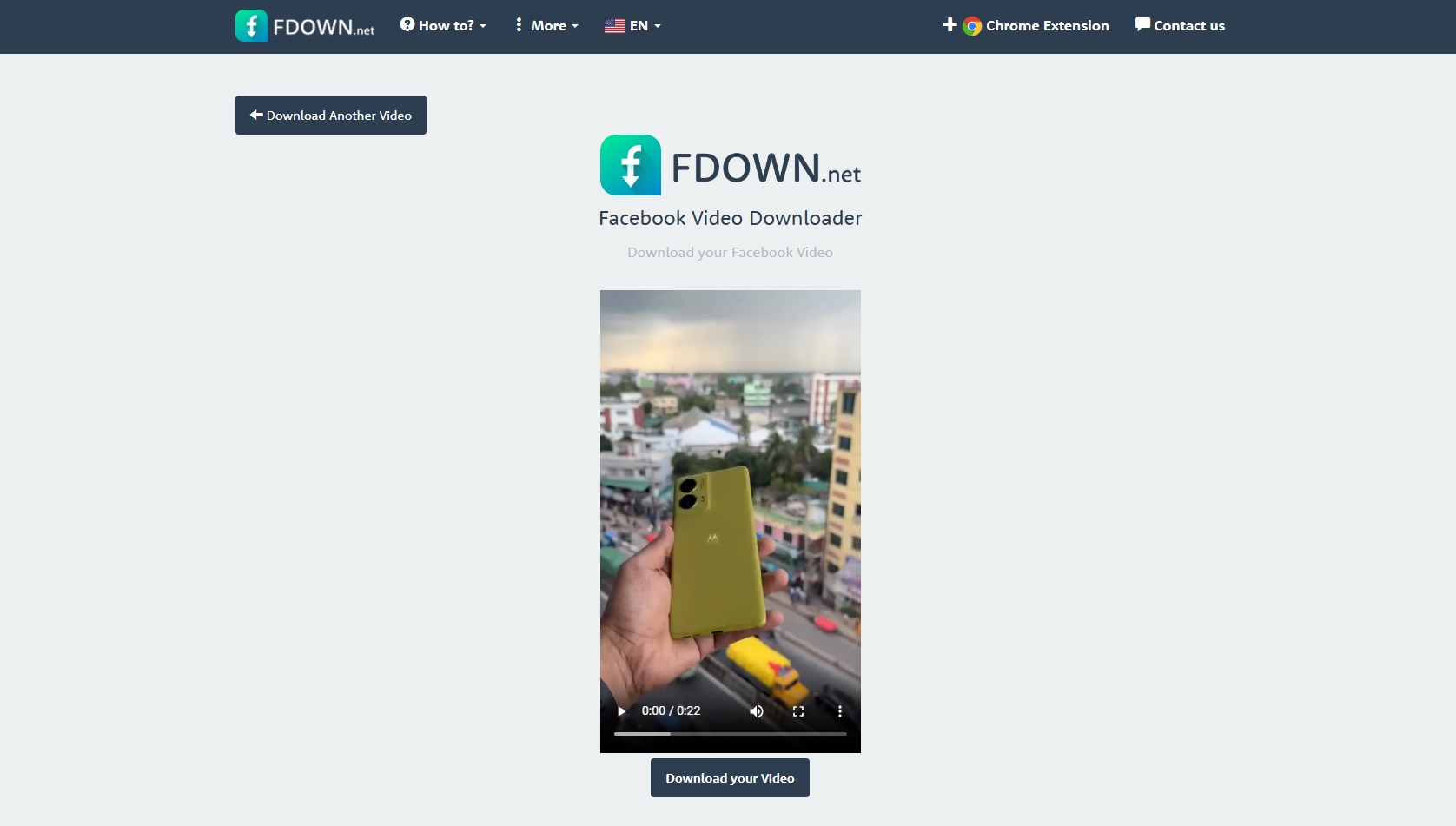
- Riproduci il video pubblicitario e vedrai un pulsante di download: cliccaci sopra per aprire una nuova scheda su fdown.net.
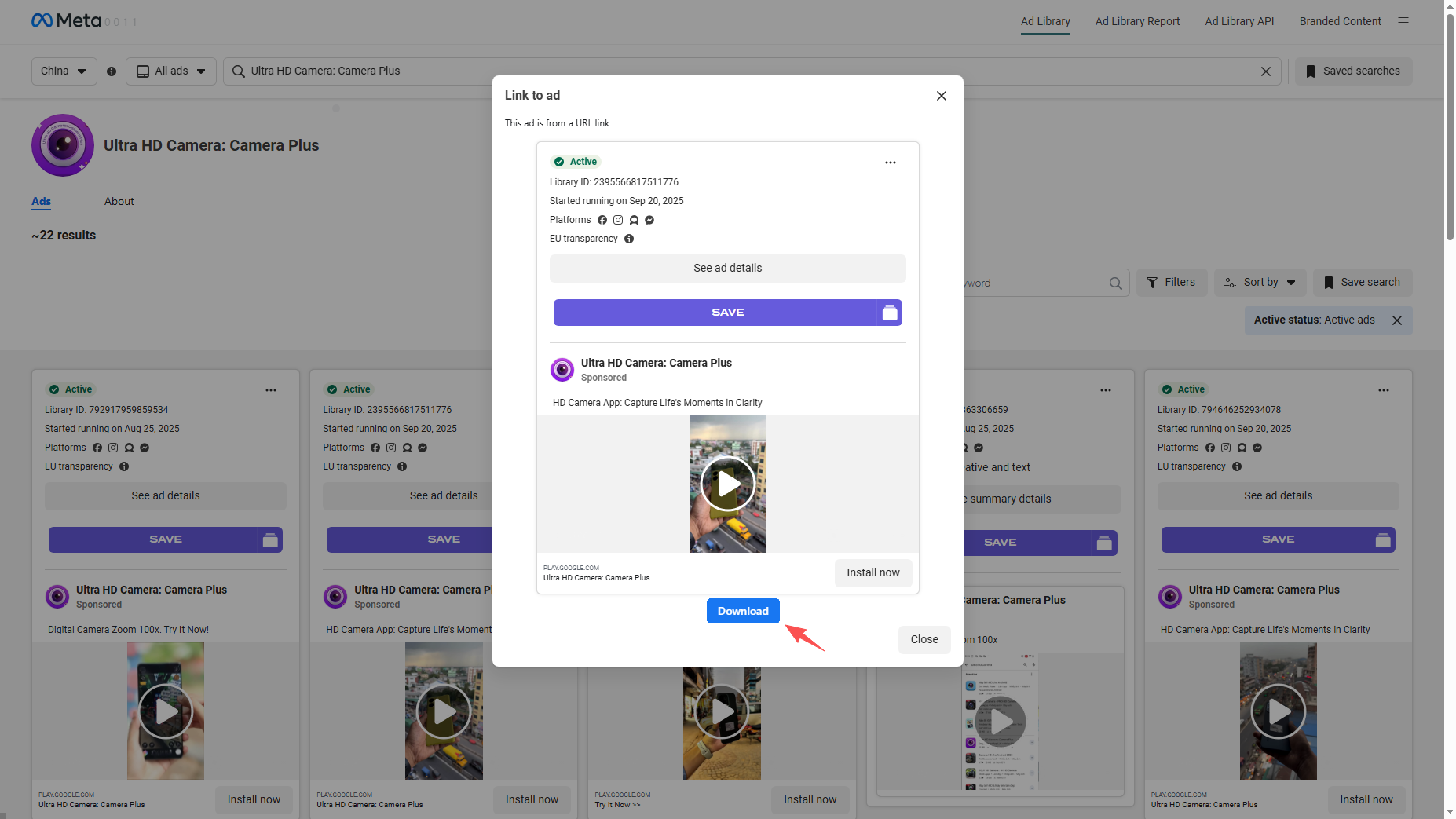
- Fai clic sul pulsante "Scarica il tuo video" e salva il video pubblicitario offline.
Pro:
- Nessuna installazione richiesta
- Semplice e adatto ai principianti
- Funziona sulla maggior parte dei dispositivi
Contro:
- La qualità video potrebbe essere limitata
- Gli annunci e i pop-up sono comuni
- Problemi di privacy e sicurezza
- Nessun download in batch
I downloader online sono adatti per il download occasionale di singoli video, ma non sono affidabili per ricerche pubblicitarie serie.
4. Scarica i video della libreria Meta Ad utilizzando le estensioni Video Downloader
Le estensioni del browser possono rilevare automaticamente i file video riprodotti su una pagina web e offrire alcune opzioni di download.
Passaggi:
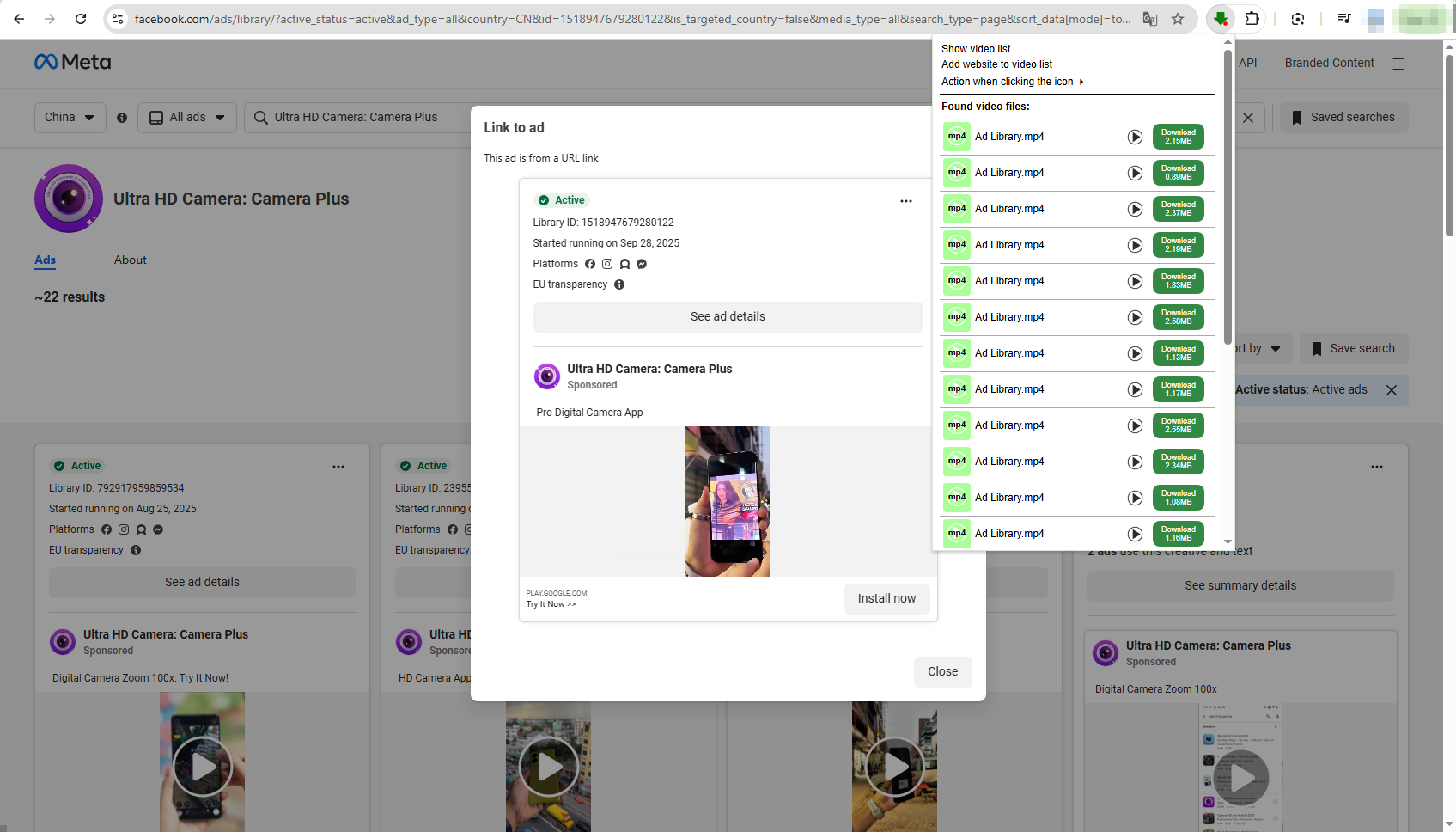
- Installa un'estensione per scaricare video, ad esempio Video Downloader Professional.
- Apri Meta Ad Library e riproduci il video dell'annuncio, quindi fai clic sull'icona dell'estensione
- Individua il video pubblicitario rilevato e scaricalo sul tuo dispositivo.
Pro:
- Più veloce dei downloader di video online
- Facile da usare
- Non c'è bisogno di copiare gli URL
Contro:
- Le estensioni spesso si interrompono dopo gli aggiornamenti Meta
- Non tutti gli annunci vengono rilevati
- Potenziali rischi per la privacy
Le estensioni per il download di video sono comode per un uso moderato, ma mancano di affidabilità e scalabilità per i professionisti.
5. Download avanzato in blocco di video della libreria Meta Ad con Meget
Per i professionisti del marketing, le agenzie e i ricercatori che hanno bisogno di scaricare in modo efficiente più video pubblicitari Meta, una soluzione professionale come Meget è la scelta migliore.
Molto Meget è un potente downloader video progettato per scaricare video di alta qualità e in grandi quantità da diverse piattaforme. A differenza degli strumenti online e delle estensioni del browser, Meget offre un ambiente desktop stabile con funzionalità avanzate pensate per gli utenti più esigenti.
Come scaricare i video della Meta Ad Library con Meget :
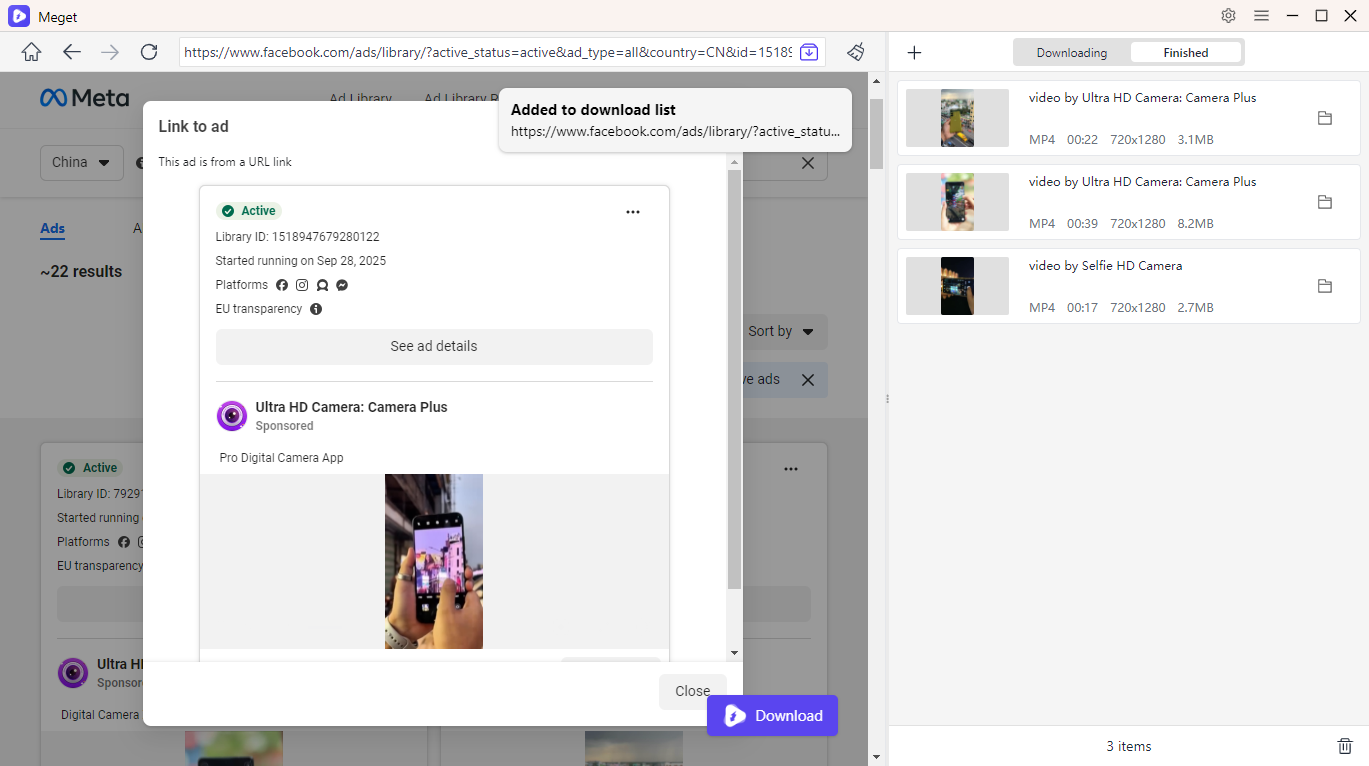
- Installa e avvia Meget, quindi scegli il formato di output e la risoluzione desiderati.
- Apri Meta Ad Library all'interno di Meget, quindi individua il video pubblicitario e riproducilo.
- Fare clic sul pulsante Scarica per mettere in coda il video pubblicitario nell'elenco dei download di Meget.
- Meget avvierà il processo di download in blocco e potrai trovare tutti i video pubblicitari scaricati nella scheda "File".
6. Conclusion
Scaricare video da Meta Ad Library può essere complicato a causa delle restrizioni della piattaforma, ma è possibile con gli strumenti giusti. Sebbene i downloader di video online e le estensioni del browser funzionino per download occasionali, non sono affidabili, di qualità ed efficienti.
Per gli utenti che necessitano di download in blocco di alta qualità per ricerche e analisi professionali, Meget si distingue come la soluzione migliore. La sua stabilità, velocità e capacità di elaborazione batch lo rendono lo strumento ideale per marketer, agenzie e analisti che si affidano alle informazioni di Meta Ad Library.
Se vuoi seriamente studiare le creatività pubblicitarie vincenti e creare un flusso di lavoro di ricerca scalabile, Molto è lo strumento che vale la pena utilizzare.