Panoramica di GenYouTube: una guida completa alle sue funzionalità e al suo utilizzo.

YouTube è diventato una delle piattaforme più grandi per la visione di video musicali, tutorial, contenuti educativi, interviste, podcast e programmi di intrattenimento. Sebbene lo streaming funzioni bene quando si dispone di una connessione internet stabile, ci sono situazioni in cui scaricare un video per la visione offline può essere più comodo.
GenYouTube è uno degli strumenti online progettati per semplificare il download dei video da YouTube. In questa guida, esamineremo nel dettaglio cos'è GenYouTube, come usarlo, come funziona la sua estensione e i suoi principali vantaggi e svantaggi.
1. Cos'è GenYouTube?
GenYouTube è un servizio online per scaricare video da YouTube che permette agli utenti di scaricare video fornendo l'URL del video. Invece di affidarsi completamente all'esperienza di streaming integrata di YouTube, il servizio è progettato per aiutare gli utenti a salvare i video online sui propri dispositivi per la visione offline.
2. Come usare GenYouTube per scaricare video di YouTube online
Uno dei principali punti di forza di GenYouTube è il suo flusso di lavoro relativamente semplice. Sebbene l'interfaccia esatta possa cambiare nel tempo, il processo tipico prevede i seguenti passaggi:
- Apri YouTube nel tuo browser, trova il video che desideri salvare e copia l'URL del video.
- Accedi al sito web di GenYouTube utilizzando un browser supportato, quindi individua il campo di input e incolla l'URL di YouTube copiato nel campo apposito.
- Fai clic su "Vai" e il servizio dovrebbe elaborare il link e identificare le opzioni di download disponibili.
- Dopo aver analizzato il video, verifica i formati e le opzioni di qualità disponibili.
- Fai clic sul pulsante di download corrispondente e attendi il completamento del processo.

3. Come utilizzare l'estensione GenYouTube?
Un'estensione per il browser può offrire un modo più comodo per accedere alle funzioni di download senza dover aprire ripetutamente il sito web principale di GenYouTube.
Passaggi:
- Installa Tampermonkey – Apri Google Chrome e installa l'estensione Tampermonkey dal Chrome Web Store.
- Installa lo script GenYouTube – Visita la pagina dell'estensione GenYouTube e aggiungi lo script di download di GenYouTube a Tampermonkey.
- Apri YouTube – Vai su YouTube e trova il video che desideri scaricare.
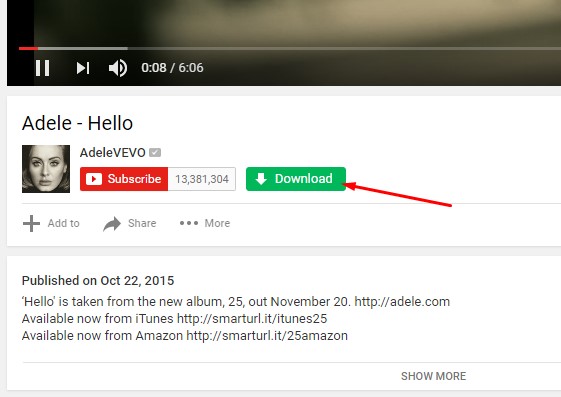
- Fai clic sull'opzione Scarica – Una volta attivato lo script, sulla pagina del video di YouTube dovrebbe comparire un pulsante/widget per il download da GenYouTube.
- Scegli un formato – Fai clic sul pulsante di download e seleziona un formato video o audio e una qualità disponibili.
- Scarica il video – Seleziona l'opzione desiderata per avviare il download del video sul tuo computer.
4. Pro e contro di GenYouTube
Come altri programmi online per scaricare video da YouTube, GenYouTube presenta sia punti di forza che limiti.
Professionisti
- Facile da usare: Il processo di download tramite URL è semplice.
- Nessuna configurazione complessa: Gli utenti possono accedere al servizio online tramite un browser.
- Comodo per download occasionali: Può essere utile quando devi salvare solo pochi video.
- Accesso tramite browser: Non è necessario installare una grande applicazione desktop per un utilizzo di base.
- Supporto per le estensioni: Un'estensione per il browser, se disponibile, può rendere più comodo il processo di download.
Contro
- Funzionalità avanzate limitate: I programmi di download online potrebbero non offrire le stesse numerose opzioni disponibili nei software dedicati per computer desktop.
- Dipendente da Internet: Il servizio richiede una connessione a Internet per elaborare e scaricare i video.
- Limitazioni di formato e qualità: Le opzioni di output disponibili possono variare a seconda del video e del servizio.
- Compatibilità con i browser: La funzionalità delle estensioni può cambiare in seguito agli aggiornamenti dei browser e dei siti web.
- Possibili annunci pubblicitari: Alcuni servizi di download online gratuiti potrebbero visualizzare annunci pubblicitari o reindirizzare a siti esterni.
- Download in batch limitato: Scaricare molti video singolarmente può richiedere molto tempo.
Per gli utenti che salvano video di YouTube solo occasionalmente, queste limitazioni potrebbero non rappresentare un problema significativo. Tuttavia, chi scarica video frequentemente, lavora con più URL o necessita di funzionalità di conversione potrebbe trarre vantaggio da una soluzione desktop più completa.
5. Prova invece il downloader e convertitore video definitivo: Meget
Se desideri qualcosa di più di un semplice programma di download online, Molto Vale la pena considerarlo. Si tratta di un programma per scaricare e convertire video su desktop, progettato per gli utenti che necessitano di un maggiore controllo sui propri download e file multimediali.
A differenza di uno strumento basato su browser che si concentra principalmente sul download di singoli URL, Meget offre una gamma più ampia di funzioni di download e conversione in un'applicazione dedicata.
Caratteristiche principali di Much:
- Download in blocco: Scarica più video o intere playlist da oltre 10.000 siti web supportati.
- Qualità fino a 8K: Scarica video con risoluzioni fino a 8K, se la sorgente lo supporta.
- Conversione flessibile: Converti video e audio scaricati in formati popolari, tra cui MP4 e MP3.
- Estrazione audio: È possibile salvare le tracce audio dei video insieme al video stesso oppure come file separati.
- Impostazioni di download personalizzate: Regola i formati, la qualità video, i sottotitoli, la posizione di salvataggio e altre preferenze.
- Rilevamento multimediale integrato: Cerca e scarica video online direttamente dall'interno dell'applicazione.
Come scaricare video con Megat:
- Installa molto: Scarica e installa Meget sul tuo computer Windows o Mac.
- Copia l'URL: Copia il link del video o della playlist che desideri scaricare da un sito web supportato.
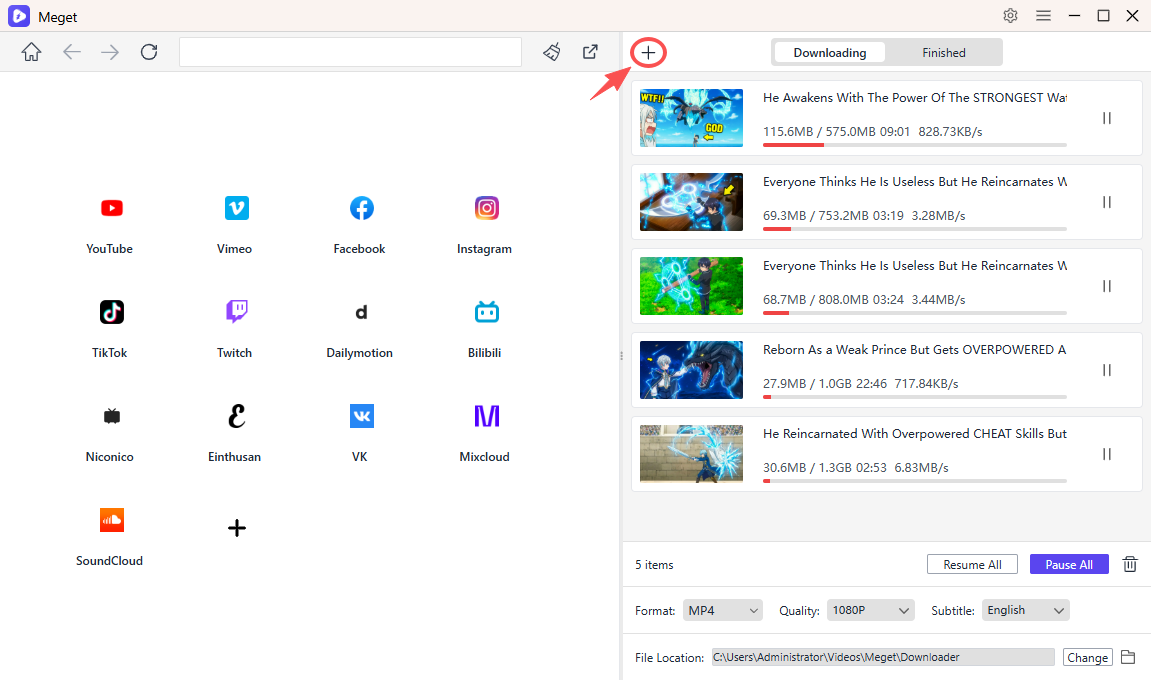
- Incolla e configura: Avvia Megat, seleziona il formato e la qualità preferiti, quindi incolla il link utilizzando "Incolla l'URL (o gli URL) per scaricare il file."
- Seleziona il contenuto: Se il link contiene più video, seleziona gli elementi specifici che desideri salvare.
- Avvia il download: Megat inizierà a elaborare il contenuto selezionato. Puoi controllare l'avanzamento del download e gestire le attività attive direttamente all'interno dell'applicazione.
6. Conclusion
GenYouTube offre un metodo semplice per scaricare video da YouTube online. Il suo flusso di lavoro basato su URL può risultare comodo per gli utenti occasionali che desiderano salvare singoli video senza installare software dedicato. L'estensione per browser può rendere il processo ancora più accessibile, a condizione che sia supportata e disponibile da una fonte affidabile.
Tuttavia, i programmi di download online e le estensioni per browser possono presentare limitazioni in termini di download in batch, conversione di formato, controlli avanzati e compatibilità a lungo termine. Se scarichi video frequentemente o hai bisogno di una soluzione di gestione multimediale più completa, un'applicazione dedicata potrebbe essere la scelta migliore.
Meget è una valida alternativa per gli utenti che cercano un downloader e convertitore video tutto in uno. Con il supporto per più piattaforme, download di alta qualità, elaborazione batch, download di playlist e conversione multimediale, offre un'esperienza più versatile rispetto a un downloader online di base. Per gli utenti che desiderano maggiore flessibilità e un flusso di lavoro più fluido, Molto vale la pena provarci.
- yt-dlp Scarica solo l'audio Audio pessimo? Risolvi il problema con queste soluzioni
- Le estensioni DRM per il download di video funzionano davvero? Prova questi strumenti alternativi
- Come risolvere l'errore 152-18 di 4K Video Downloader?
- Le migliori alternative a CocoCut per scaricare video che dovresti provare
- Come scaricare da Movies2Watch?
- Recensione di Tuberipper: vale la pena usarlo?
- yt-dlp Scarica solo l'audio Audio pessimo? Risolvi il problema con queste soluzioni
- Le estensioni DRM per il download di video funzionano davvero? Prova questi strumenti alternativi
- Come risolvere l'errore 152-18 di 4K Video Downloader?
- Le migliori alternative a CocoCut per scaricare video che dovresti provare
- Come scaricare da Movies2Watch?
- Recensione di Tuberipper: vale la pena usarlo?